Point of Sale
Request For a Free Demo and Let's Call You Back
Point of Sale Solutions
Technology development can take over manual tasks and help increase productivity. In daily life, we may catch a popular scene of a sales rep using computers and mobile devices to serve shoppers in the store. This is considered an innovation in the retail market when merchants started applying POS systems to their daily operations.
POS stands for point of sale and is clearly defined by Investopedia as a place where sales are made. “On a macro level, a POS may be a mall, a market, or a city. On a micro level, retailers consider a POS the area where customers complete transactions, such as checkout counter”.
In the following, we’ll discover the top 9 POS advantages for shoppers and retailers and ways to optimize its performance for more benefits.
Multiple Location
Get a real-time view of your cash flow. Full-fledged accounting module covering every aspect of bookkeeping.
Manage Users
User & Role Management plus contacts (supplies and supplies).
Product & Purchase
Manage products and purchases effectively.
Track Sales and Expenses
Conveniently track all your sales and expenses
Extract various reports
Generate useful & detailed reports
Best Stock Management, POS & Invoicing application
With our POS application, you are assured to save time-consuming process of bookkeeping accounting and inventory information.

Manage multiple business and add locations conveniently
- Multiple Business/Shops:
Set up multiple businesses in the application with no restriction on numbers of businesses with inventory & accounting information being kept separately for each business.
- Add Location / Storefronts / Ware House:
Create multiple locations for your business/shop. Manage all of them at the same time. Stocks, Purchases, Sell can be tracked differently for locations. Customize invoice layout, invoice scheme for each location
Manage users and their roles. Manage contacts
- User & Role Management:
Powerful user and role management system. Predefined roles – Admin & Cashier. Create different Roles with permission as per your need. Create unlimited users with different roles.
- Contacts (Customer & Suppliers):
Mark contact as customer or supplier or both(customer & Supplier). View details of transactions with a contact. View total of Credit/Debit balance amount. Define pay term and get payment alerts week before the due date.

Product and purchase management
- Products
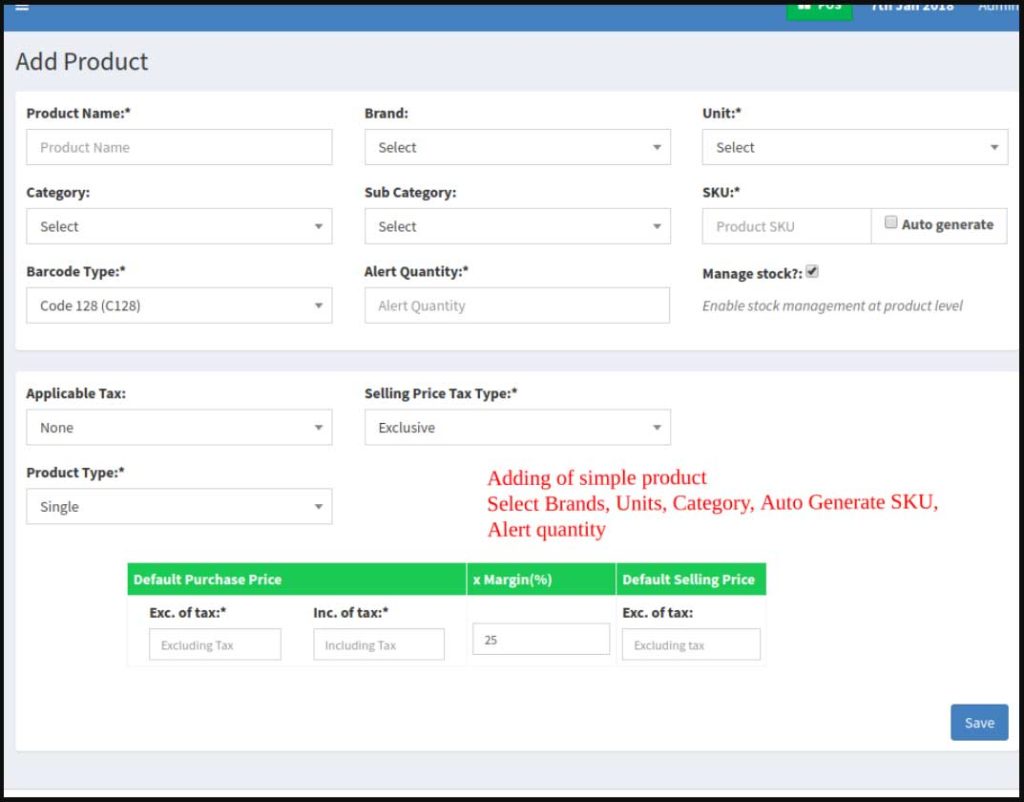
Manage Single & Variable products. Classify products according to Brands, Category, Sub-Category. Add products having different units. Add SKU number or auto-generate SKU number with prefixes. Get stock alerts on low stock. Save time by auto calculating selling price, the system is smart to auto calculate selling price based on purchase price and profit margin. No need to type variations every time, create variation template and use it every time you need to create variable products.
- Purchases:
Easily add purchases. Add purchase for different locations. Manage Paid/Due purchases. Get Notified of Due purchases week before the pay date. Add discounts & Taxes
Track sales and expenses
- Sell:
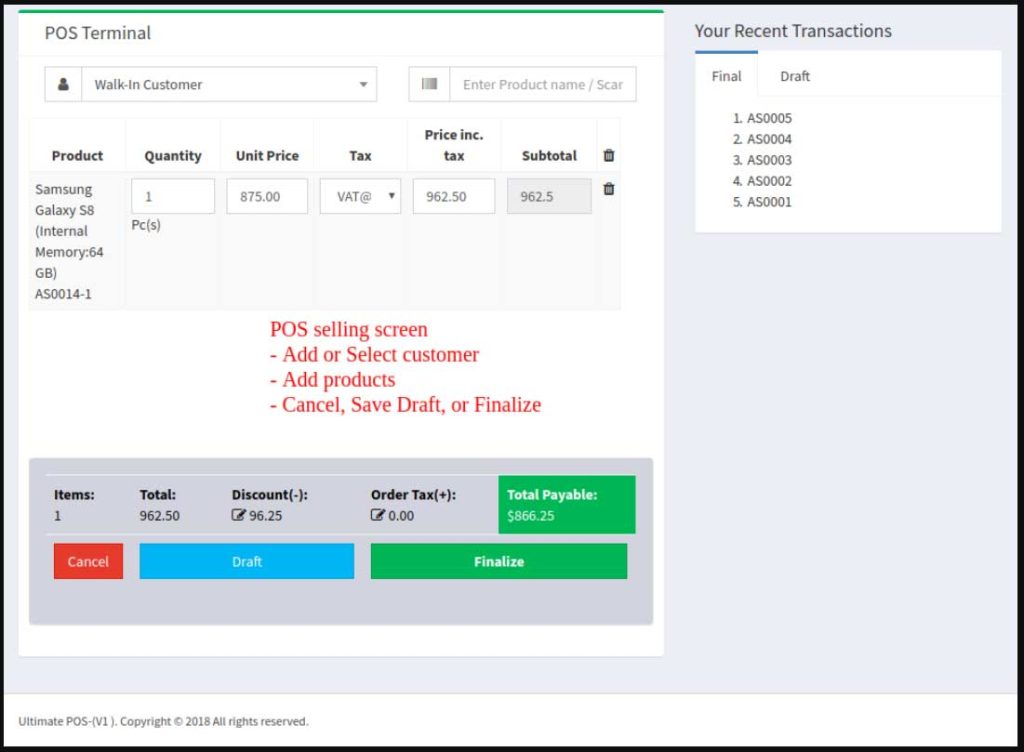
Simplified interface for selling products. Default Walk-In-Customer automatically added to a business. Add new customer from POS screen. Ajax based selling screen – save reloading time. Mark an invoice for draft or final. Different options for payments. Customize invoice layout and invoice scheme.
- Manage Expenses:
Easily add business expenses. Categorise expenses. Analyse expenses based on category and business locations with expenses report.
Extract various reports
- Reports:
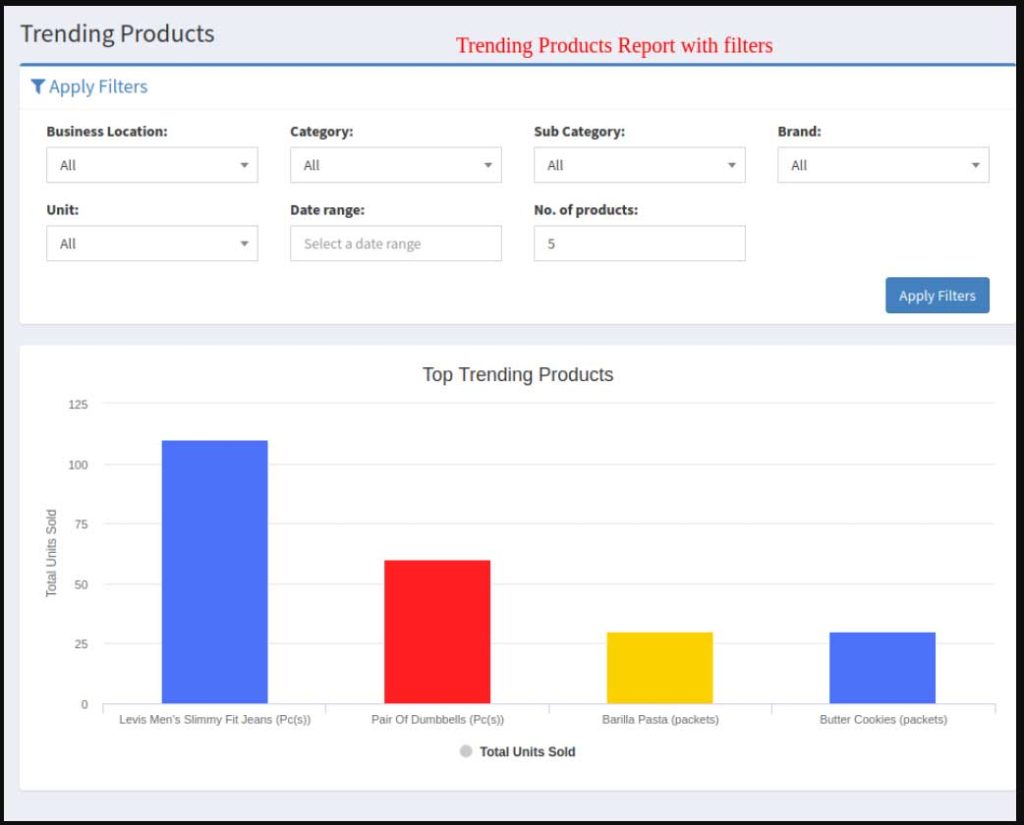
Purchase & Sale report. Tax Report. Contact Reports. Stock Reports. Expense Report. View Trending Products, drill down by Brands, Category, Sub-category, Units and date ranges. Expense Reports. Cash Register Report. Sales Representative report
- Other useful feature:
Set currency, time zone, financial year, the profit margin for a business. Translation ready. Predefined barcode sticker settings. Create your barcode sticker setting. Manage Brands, Tax Rate & Tax groups, Units, Category & Sub-Category. Easy 3 steps installation. Detailed documentation. Stock Adjustment. Express Checkout. Works Offline